
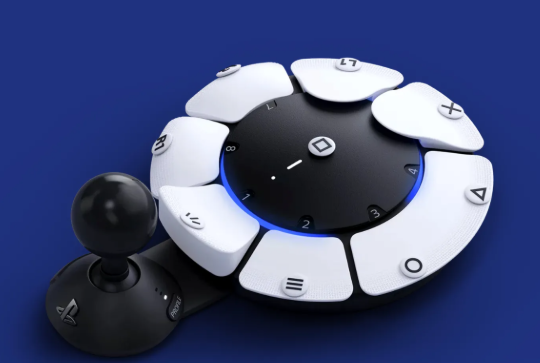
The PlayStation Access Controller (released by Sony for PS5) is an adaptive game controller designed for players with limited mobility. It’s built so users can customize the layout, buttons, and input style to match their physical needs.
Form Factor & Shape
- The Access Controller is circular, roughly the size of a small dinner plate.
- Its surface is a flat disk made of textured matte plastic.
- Designed to sit on:
- a table
- wheelchair tray
- your lap
- or mounted to arm mounts, tripods, or adaptive platforms via standard 1/4″ mounting threads.
Button Layout
There are 9 large, reprogrammable buttons arranged around the edge of the circle.
Each button has:
A large surface area
- Replaceable button caps (included in the box)
- Custom shapes: flat, convex, concave, tall, or wide
- High-contrast icons that snap on magnetically
The large size allows pressing with:
- hand
- palm
- fist
- elbow
- forearm
- or assistive tools
Each button is fully remappable in the PS5 settings.
Now that we’ve powered through all that expensive marketing mumbo-jumbo, let’s talk about what the PlayStation Access Controller actually does — you know, real-world use cases, not “immersive adaptive synergy” corporate poetry.
The PlayStation Access Controller — or PAC, because everything sounds cooler as an acronym — packs most of the important PS5 buttons: triangle, circle, square, cross, and even a joystick you can program as the left or right stick.
Buuut… you’ll still need a partner in crime for the other stick. That could be your mouse, keyboard, a foot pedal, a toaster with Bluetooth — whatever gets the job done.
In my case, this setup works beautifully. I use my weaker left hand on the PAC joystick to move my character around, while my right hand works the mouse — loaded with pre-programmed buttons and supercharged with REWASD macros that give me a “competitive advantage.”
(Translation: I press one button and magic happens.)
What surprised me most? It actually works really well on PC. Windows recognizes it as a PS5 DualSense Controller, which is basically its way of saying, “Sure, why not?”
The only drawback: some buttons won’t show up correctly until you download a proper PS5 game profile into the controller. Luckily, a fantastic YouTuber has already done the hard part for us — so go check him out and smash that subscribe button like it owes you money.
(And yes, you can download profiles using your PS5 too.)


Leave a Reply